Wednesday, June 12, 2013

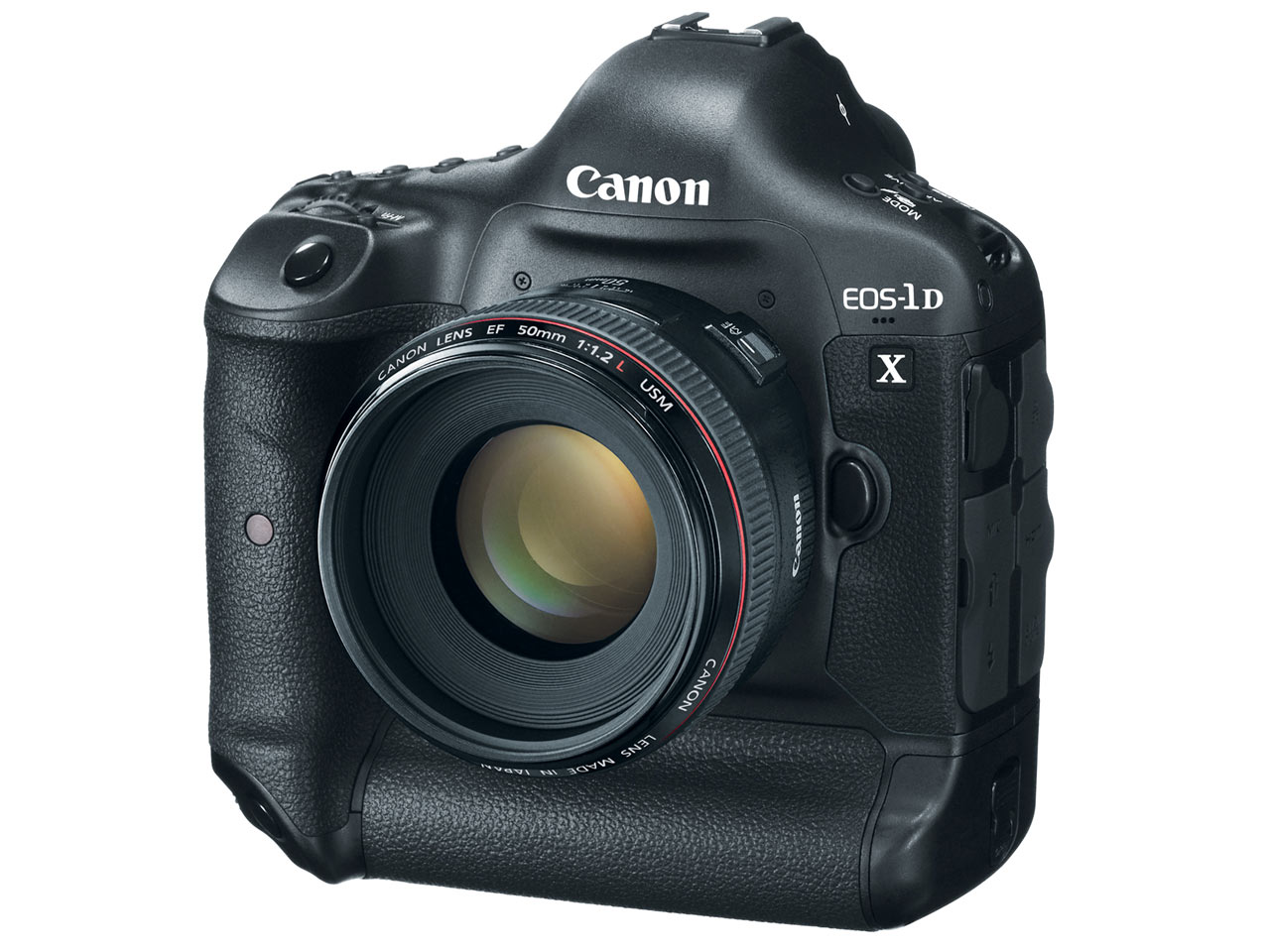
EOS-1D X firmware Version 1.2.4 available for download


Canon has announced that a new firmware update – Version 1.2.4 – for its flagship EOS-1D X DSLR is now available for download. Details of the exact firmware fixes and improvements are shown below...

EOS-1D X Firmware Version 1.2.4

Firmware Version 1.2.4 incorporates the following functional improvements and fixes:
  1. Improves the speed of the camera’s acquisition of focus when using a Canon Speedlite’s AF-assist beam.
  2. Reduces the time it takes to display the metering result on the LCD or Viewfinder when the meter has been activated.
  3. Fixes a phenomenon in which a ‘Caution 02’ message is unnecessarily recorded in the camera status log.
  4. Fixes a phenomenon in which continuous shooting pauses when using a Canon Speedlite.
  5. Fixes a phenomenon*, when the GP-E1 is attached, which causes the GPS device settings to be reset to default when the camera has been powered off.
Note:
* This phenomenon occurs only with firmware Version 1.2.1.
* After changing the GPS device settings, please be sure to power off the camera before removing the battery. This will ensure that the camera's GPS device settings will be saved.
EOS-1D X Firmware Version 1.2.4 is available to download – please click www.avantech.com.mt, then enter your country and camera details and select the firmware option to download the firmware. Firmware Version 1.2.4 is for cameras with firmware version 1.2.1 or earlier. If your camera’s firmware is already Version 1.2.4, it is not necessary to update the firmware. Please remember to read all of the instructions carefully before downloading the firmware.

Thursday, June 6, 2013

Photographer ‘Shops His Baby Daughter Into Strange Situations


Photographer Shops His Baby Daughter Into Strange Situations daughtershopped 7 457x620
When Emil Nyström‘s daughter Signhild grows up, she’ll have a number of baby photos showing how adventurous she was as an infant. Since Signhild was less than 1, Nyström has been creating whimsical conceptual photos of the girl in strange situations.

The Umeå, Sweden-based photographer uses clever photography and careful Photoshop work to create the images, which show Signhild doing everything from painting a room in their house to chopping flying fruit as the Fruit Ninja.
Photographer Shops His Baby Daughter Into Strange Situations daughtershopped 1
Photographer Shops His Baby Daughter Into Strange Situations daughtershopped 10
Nyström tells us that his ideas come from places at different times. For example, the painting photo above came about when the family decided to have one of their rooms repainted. Shooting the photo involved holding Signhild up and then digitally removing the supporting arms:
Photographer Shops His Baby Daughter Into Strange Situations posing
The photographs in the series were shot using a Canon 5D Mark II, Canon 16-35mm f/2.8, and Sigma 50mm f/1.4.
Here’s what he tells us about shooting the actual photographs:
When shooting a baby like mine, I have to prepare a lot before I shoot, since she is usually not very keen on long working hours. If I get 15 engaged minutes, I’ve had it good. So lights, settings, scenery have to all be in place. Once the baby is on scene, I have to try getting the right facial expression and all the right poses as quickly as possible. Usually I get help from my wife with it. Sometimes when it’s more elaborate we have to have even more people helping. Other then that, there is usually not many problems with these types of shots.
Photographer Shops His Baby Daughter Into Strange Situations daughtershopped 2 438x620
Photographer Shops His Baby Daughter Into Strange Situations daughtershopped 3
Photographer Shops His Baby Daughter Into Strange Situations daughtershopped 4
Photographer Shops His Baby Daughter Into Strange Situations daughtershopped 5
Photographer Shops His Baby Daughter Into Strange Situations daughtershopped 6 412x620
Photographer Shops His Baby Daughter Into Strange Situations daughtershopped 8 412x620
Photographer Shops His Baby Daughter Into Strange Situations daughtershopped 9

Wednesday, June 5, 2013

Canon EOS 650D: tips for using your EOS camera


Canon 650D: tips for using your EOS camera
So you think you know how to use your Canon 650D? Like many of us, you may have a DSLR or compact system camera but tend to use only a handful of your its features.
In our ongoing review of some of the more popular current and ‘out of date’ Canon cameras, we want to help you better harness the creative potential of your camera.
Call them camera tips, or call it a user’s guide to your favourite Canon camera. The advice below comes from experts who have used the Canon 650D and know this DSLR inside and out.
If you have your own Canon 650D tips you’d like to share, post them in the comments below. What we want to build is an ever-growing user’s guide for the Canon 650D that comes not from a press release or a lab test, but from the photographers who shoot with this DSLR.
We want to inspire you to twist the mode dial and move beyond your favorite settings and functions and get more out of your Canon 650D starting today!
How to use your Canon 650D: tip 1
1 Nose adjustments
If you’ve activated the touchscreen on the ‘Q’ menus, the viewfinder sensor won’t switch off the LCD when you hold the camera to your eye, and this means you can change settings accidentally with your nose! So switch off the LCD by pressing INFO.

How to use your Canon 650D: tip 2
2 Better audio
The 650D offers continuous focus for shooting movies, but the noise made by the focusing system’s motor as it makes adjustments can be picked up by the on-
board stereo microphones. For audio that matches the quality of the pictures, use an external mic.

How to use your Canon 650D: tip 3
3 Picture Style Auto
Like the 600D, the 650D has an Auto setting for Picture Style. This has a tendency to create a more vibrant image, so if you’re looking for a more subtle colour palette, choose the Faithful or Neutral Picture Style (if you shoot Raw you can change styles in DPP).

How to use your Canon 650D: tip 4
4 Movie Servo AF
The autofocus is set to Continuous by default when you enter Movie mode. As well as tapping the icon on screen to switch this feature off if you want to focus manually, you can disable the setting in the Live View shooting menu (the fourth red menu).

How to use your Canon 650D: tip 5
5 Auto ISO
If you select the Auto ISO option, the camera won’t select an ISO higher than ISO6400, in order to ensure the best possible image quality. If you want a higher sensitivity, to enable you to use a faster shutter speed or narrower aperture, you’ll have to set it manually.


Thursday, May 30, 2013

Blurring water for creative effect

Often photography is about freezing the action. But increasing the time the shutter is open can also create atmospheric images.

Pontneddfachan, © Gordon Stirrat 2011, Canon EOS 30D

So how do you create an image that makes the water blur, giving this dreamlike appearance? The technique is to use a slow shutter speed; the longer the exposure, the smoother the water appears.
Move the Mode Dial on the top right of your EOS onto Tv. Tv (Shutter-priority AE) lets you select the shutter speed for your picture whilst the camera chooses the correct aperture setting so that you still get the right exposure. Use the Main Dial just behind the Shutter Button to select your shutter speed. The amount of blur will depend on the speed of the subject and the length of the exposure.
You will need to experiment with the shutter speed a little to get effective blur of the water as it depends on how quickly the water is flowing. A good shutter speed to start with is 1/2 second. Often exposures of 30 seconds are used to give a really smooth finish. A useful tip is to select a lower ISO Speed (the sensitivity of image sensor on your camera to light), which will let you choose slower shutter speeds.
Although you are blurring the water, it is important that the rest of your photo is sharp, so you need to make sure that your camera is steady and doesn't move. A tripod is best for this as it allows you to be more flexible with location; at the very least you will need to find somewhere to rest your camera.
Long Exposure Noise Reduction
Digital images can show increased ‘noise’ (grain effect) with long shutter speeds. You can reduce this by switching on ‘Long Exposure Noise Reduction’ available on many EOS models in the Custom Functions within the <MENU> settings. Check your Instruction Manual (downloadable here) as exact operation varies from EOS to EOS.
However, it takes the camera as long to do save your image using this feature as the actual exposure, so a 15 second exposure will take 30 seconds to be saved and for the result to be shown on your camera’s LCD screen.

Wednesday, May 22, 2013

Our winner from the 'Black & White' competition

This impressive winning shot pictured below was taken by Charles Paul Azzopardi at the performance titled 'The Death of Snow White' by Naupaca Dance Factory.


Charles Paul Azzopardi won a Selphy CP900 compact photo printer and ink & paper set; pictured below with Avantech representative Nakita Vassallo.


Check out his facebook page for more captivating shots!

Monday, May 20, 2013

Making the most out of DPP - free course available for 50 people!


For all those who missed out last time; once again we are organising a free DPP tutorial at Avantech on Tuesday the 28th May at 7:30pm.

Hurry - only 50 places available - first come first served on a registration basis!


For more info and registration:
http://www.avantech.com.mt/digital-photo-professional-software-dpp-usage-free-course/

Wednesday, May 15, 2013

How the 2013 World Press Photo of the Year was faked with Photoshop


 An independent expert in the field of image forensics, Hany Farid, has analyzed the original Raw file, compared it to the prize-winning JPEG file, and concluded that “all of [the pixels] are exactly in the same place.” He also says that the final photo has experienced “a fair amount of post-production” (as in, dodging, burning, etc.), which probably explains a lot of the seemingly incredible lighting in the image.

It turns out that the 2013 World Press Photo of the Year — the largest and most prestigious press photography award — was, in actual fact, a fake. The World Press Photo association hasn’t yet stripped the photographer, Paul Hansen, of the title, but presumably it’s just a matter of time. Rather than discussing the politics of photo manipulation, though — is it faked, or is it merely enhanced? — we’re going to look at how Hansen seemingly managed to trick a panel of experienced judges with his shooping skillz, and how a seasoned computer scientist spotted the fraudulent forgery from a mile off.

The photo, dubbed Gaza Burial, was purportedly captured on November 20, 2012 by Paul Hansen. Hansen was in Gaza City when Israeli forces retaliated in response to Palestinian rocket fire. The photo shows two of the casualties of the Israeli attack, carried to their funeral by their uncles. Now, the event itself isn’t a fake — there are lots of other photos online that show the children being carried through the streets of Gaza — but the photo itself is almost certainly a composite of three different photos, with various regions spliced together from each of the images, and then further manipulation to illuminate the mourners’ faces.

This revelation comes from Neal Krawetz, a forensic image analyst. There were two main stages to the analysis: First an interrogation of the JPEG’s XMP block, which details the file’s Photoshop save history, and then pixel-level error level analysis (ELA). To begin with, the XMP data shows that the original, base image was converted from Raw format and opened in Photoshop on November 20, 2012 (the same date that it was taken). Then, on January 4, 2013, the XMP block shows that a second Raw image was opened and added to the original. An hour later, a third image was spliced in. Finally, 30 minutes later the photo chimera was actually saved to disk. The January 4 date is interesting because it shows that the final photo was only edited a couple of weeks before the January 17 submission deadline, not soon after original photo was taken in Gaza — in other words, it was probably edited specifically for the contest.


2013 World Press Photo of the Year: Gaza Burial, by Paul Hansen, subjected to ELA analysis by Neal Krawetz

The next step is error level analysis. ELA basically compares the error level of pixels that have been modified by the JPEG compression algorithm (low amounts of change), and pixels that have been modified with photo manipulation (higher change). In the image above, which has been subjected to ELA, we see clear markers that are consistent with the photo’s spliced-and-manipulated history. Regions that have only been subjected to normal JPEG compression should have faint red/blue patches, while white patches show areas that have been subject to other forces. The bright white edges are caused by Photoshop’s sharpening algorithm — but the other bright white regions are likely due to extensive manipulation. Take a look at the man on the far left, carrying the child’s feet — his magically, digitally illuminated face is clearly shown on the ELA map. In fact, almost every face in the picture has been brightened, as have the children’s shrouds.

The final nail in the coffin is good ol’ shadow analysis. At the time the photo was taken — 10:40am, in the winter — the sun should be fairly low in the sky. The shadows on the left wall are consistent with a sun location (shown below) that should cast deep, dark shadows on the mourners’ right sides — but, as you can see, those magical light rays seem to be at work again.



Basically, as far as we can surmise, Hansen took a series of photos — and then later, realizing that his most dramatically situated photo was too dark and shadowy, decided to splice a bunch of images together and apply a liberal amount of dodging (brightening) to the shadowy regions. For what it’s worth, Hansen claims that the light in the alley was natural — and to be fair, sometimes magical lighting does occur. I think most of you will agree, though, that the photo simply feels fake — there’s just something about the lighting that sets off a warning alarm in your brain. As for why World Press Photo didn’t forensically analyze the photo using freely available, advanced, accurate analysis tools such as FourMatch or FotoForensics… who knows.

Oh, I forgot to mention the best bit: Hansen was meant to provide the Raw file for his winning photo, as proof that he didn’t significantly modify the final image — but so far, he hasn’t.

When is an image fake, and when is it merely enhanced?

The bigger discussion, of course, is whether Gaza Burial is actually fake — or just enhanced to bring out important details. This is a question that has plagued photography since its inception. Should a photo, especially a press photo, be purely objective? Most people think the answer is an obvious “yes,” but it’s not quite that simple. What if a photo is perfect, except that it’s taken at an odd angle — can you digitally rotate it? What about cropping? What if there’s dust on the lens/sensor/film — can you digitally remove it?

Perhaps most importantly, though, cameras simply don’t capture the same gamut of color or dynamic range as human eyes — a photo never looks the same as the original image perceived by your brain. Is it okay for a photographer to modify a picture so that it looks exactly how he remembers the scene?

Tuesday, May 14, 2013

Super-telephoto zoom with built-in extender now available


Canon has announced its unique EF 200-400mm f/4L IS USM EXTENDER 1.4x telephoto zoom lens – that has an integrated focal length extender to take its zoom range up to 560mm.

Developed as part of the acclaimed L-series of Canon professional lenses the new zoom is a high-performance lens that features a built-in 1.4x extender, which can be accessed and turned on or off at the flick of a switch at the rear of the lens, and provides stunning image quality throughout the full zoom range.

The lens offers an unsurpassed combination of versatility, first-class optical performance and superb construction. High-quality images with high levels of resolution and contrast are possible through the use of advanced optical materials such as fluorite crystal. The new lens uses magnesium alloy for the main components to ensure it is lightweight (3.6kg), and it has a dustproof and waterproof construction that’s designed for extended usage in harsh conditions.

The lens’ optical elements feature Canon's SubWavelength Structure Coating (SWC), that's optimised to effectively reduce ghosting that can be caused by light bouncing back from a camera sensor. A water-repellent fluorine coating is also used on the surface of the front and rear elements of the lens – this coating repels dust and dirt for clearer shots and keeps the front element free of marks by ensuring that water droplets run off the lens quickly.


Enhanced IS technology
The zoom lens features Canon's latest Image Stabilizer system, offering outstanding image quality during handheld shooting and allowing users to shoot at speeds up to four times slower than normally required. IS Mode 2 features new algorithms to improve performance when panning, and the new IS Mode 3 is also included, assisting users when switching between subjects by activating the IS unit only during exposure.

The constant f/4 aperture of the lens allows photographers to achieve excellent image quality in low light and to capture clear, sharp shots of fast-moving subjects. The wide aperture also allows users to creatively isolate their subjects from the background, with a nine-blade circular iris that’s capable of creating beautiful background blur (bokeh) to instantly add atmosphere to an image.

Rapid, quiet autofocus (AF) is provided by a ring-type Ultrasonic Motor (USM). Photographers can also utilise full-time manual focusing functionality, which enables the fine-tuning of focus even when the AF system is activated, thus providing even greater control over image capture. Power Focus mode also assists users during video shooting, allowing photographers to smoothly adjust focus during filming by twisting the focus recall ring.

The unique zoom lens is an ideal addition for action, sports and wildlife photographers who require high optical performance and a flexible telephoto range. It will enable photographers to shoot a greater breadth of subjects using a single lens, delivering the best possible image quality at all focal lengths.

Monday, May 6, 2013

Canon wins five honours at the 2013 TIPA Awards


Canon today announces it has been awarded five honours by the Technical Image Press Association (TIPA) – one of the world’s leading photo imaging and press associations. The TIPA Awards commend the most outstanding imaging products launched in the past year, and in 2013 Canon has again been acknowledged for the breadth, strength and industry-leading quality present across its product line-up. The following awards have been granted:

• Best DSLR Entry Level: Canon EOS 100D
• Best DSLR Expert: Canon EOS 6D
• Best Professional DSLR Lens: Canon EF 24-70mm f/2.8L II USM
• Best Expert Photo Printer: Canon PIXMA PRO-10
• Best Video DSLR: Canon EOS-1DC

The TIPA panel has a membership comprising of editors from 28 of the world’s leading photography and imaging magazines, spanning 15 countries across five continents. The panel meets annually to discuss the latest products and considers a range of factors, from innovation to design and overall product quality, when selecting and acknowledging the best imaging products.

“This is yet another strong showing from Canon in the TIPA Awards,” said Kieran Magee, Marketing Director, Professional Imaging, Canon Europe. “Such recognition from TIPA clearly demonstrates the level of quality and innovation that is present throughout our product range, from our consumer and amateur models to our professional line. We constantly challenge ourselves to raise the bar at all levels of our product portfolio, and we’re happy and proud to see that has again been recognised by the TIPA panel.”
In honouring Canon’s award-winning products, the TIPA judging panel offered the following citations:

Best DSLR Entry Level: Canon EOS 100D
The Canon EOS 100D challenges the assumption that DSLRs need to be bulky and creates an attractive alternative to smaller CSC format cameras for those seeking DSLR handling, viewing and of course access to the entire range of Canon EF and EF-S lenses in a very portable and lightweight body. Its 18MP CMOS APS-C sensor has an ISO range of 100-12,800 for stills and 100-6400 for video. Hybrid CMOS AF II offers accurate focus tracking during Live View shooting, and video quality is enhanced with Full HD and Movie Servo AF capability. A 3-inch LCD Touch Screen provides ready access to camera controls and functions including numerous Scene and Creative modes.

Best DSLR Expert : Canon EOS 6D
The Canon EOS 6D melds consumer-oriented features with a very advanced set of photo options. It has a 20.2MP full-frame CMOS sensor and can record Full HD 1080p video; the full frame advantage here is excellent quality at its highest “native” ISO of 25,600 and beyond. The bright 104k 3-inch monitor offers high-resolution viewing for video and live view still shooting, as well as access to many creative controls. A “Q” button evokes a screen menu with the most used controls that, with other dedicated buttons and an 8-way toggle control, makes for a very pleasing and fast shooting experience.

Best Expert Photo Printer : Canon PIXMA PRO-10
The PIXMA PRO-10 is a wireless and AirPrint capable printer that utilizes Canon’s new 10-colour LUCIA pigment inks, plus incorporating a Chroma Optimizer cartridge that helps eliminate bronzing and metameric failure effects. The printer offers two paper feeds—a rear tray for a variety of papers and a manual slot feed for thicker and heavier weight inkjet substrates. Utilizing 7,680 4-picoliter-size nozzles, the unit can deliver up to 4800 x 2400 dpi in both colour and monochrome images in sizes up to 13 x 19 inches (A3+). Print speed for an 11x14-inch image on A3+ paper is 3mins 35 secs (5 mins for PT-101).

Best Video DSLR : Canon EOS-1D C
As the first Canon “hybrid” DSLR, the EOS-1D C has an 18MP full frame CMOS sensor that can capture 4K (4096x2160) or HD video as well as 18MP still images in JPEG and/or RAW format. Geared towards film and TV production, as well as specialty work, onboard 4K recording can be done at 24p or 25p and HD recording at frames rates up to 60p. Recording is done onto CF cards and all Canon EF-mount lenses can be utilized, The EOS-1D C also has all the features of a pro DSLR for still recording, making it an extremely versatile camera for today’s pro shooters.

Best Professional DSLR lens: Canon EF 24-70mm f/2.8L II USM
This constant aperture Canon zoom is constructed of 18 elements in 13 groups and utilizes 1 Super UD lens element and 2 UD lens elements. Two types of aspherical lenses are combined to help reduce spherical aberration over the entire image area through the full zoom range, plus optimized lens coatings are used to minimize ghosting. The lens is equipped with a circular 9-bladed diaphragm and a ring-type USM and high-speed CPU with optimized AF algorithms to enable silent and fast autofocusing. It is constructed with improved dust sealing and water resistance with fluorine coatings on the front and rear lens surfaces.

Thursday, April 25, 2013

Competition time everyone!!


Submit a photo fit for the theme 'Black & White Photography'.  Photos must be posted on our facebook wall (facebook page: http://www.facebook.com/canonmalta).

Submitted photos may be used for other promotional material, such as our blog, for posters, for showroom display and/or other marketing material.
Winner will be selected by Avantech Ltd. and will win a Selphy CP900 and ink & paper set KP-108.

The prize:


HOW TO APPLY:
Post ONE photo on our wall.  Please make sure you caption it as 'competition entry'.

RULES:
1. This competition is not open to employees of Avantech Ltd. or their immediate family members.
2. Only one photo per entrant is allowed.
3. Photos must be the original work of the named entrants, respectively.
3. Competition closes at midday Friday 10th May.
4. Competition entrants must be 18 and over, unless we have written consent by a parent/guardian.  Entrants must be residents of the Maltese Islands.
5. The winner must agree to a photo of Avantech Ltd presenting the prize, along with the photo being used for marketing activities.  The winner will always be notified in such cases.

Avantech Ltd. reserves the right to refuse any entry and/or disqualify any entrant if the above rules are not adhered to.  

Good luck!!

Monday, April 22, 2013

Friday, April 12, 2013

Spring Offers

Get a free Canon product with every Canon machine listed on the below poster - For further details please contact us on 21488800 or send us an email on info@avantech.com.mt
 
Offers Valid till end of June 2013
 

Laser Offers


Get a € 10, € 15 or € 20 voucher when purchasing a Canon Laser machine (Offer valid on selected models only)
 
For further details please contact us on 21488800 or email us on info@avantech.com.mt
 
Offers Valid till end of June 2013


Tuesday, April 9, 2013

Canon Powershot lost in Maui 6 years ago reunited with owner


After a camera lost on Maui nearly six years ago ended up in Taiwan, it didn't take long for Hawaii News Now to track down its owner.


Our viewers made the story happen when they helped us track down the owner of a camera that floated thousands of miles from Hawaii shores... Now, check out the photos stored on the camera that were preserved despite years at sea!

Lindsay Scallan of Newnan, Georgia never imagined that she would see the precious photos from her past again. She snapped them during her Maui vacation in 2007, but lost her new camera during a night scuba dive in Kaanapali.

"The seas were really rough. There was a lot of sand stirred up. It was hard to see," said Scallan.

Scallan returned to the beach the next morning, hoping the camera had washed up on shore.

"But of course, we didn't find it, so at that point I just gave up. I was pretty disappointed because I had all my vacation pictures on there. Plus, the cost of the camera," Scallan said.

The Canon PowerShot was in a waterproof case and it drifted thousands of miles to Taiwan. A China Airlines employee discovered the camera on a beach last month. The airline asked Hawaii News Now to help find the owner seen in many of the pictures. Once the story hit the airwaves and the internet, Scallan's friend sent her a link.

"I just was floored that it was my camera and it was all my old pictures and it was amazing. I just couldn't believe it had floated so far, so long ago and the memory card was still intact," said Scallan.

China Airlines has offered to fly Scallan to Taiwan to be reunited with her camera, but she isn't sure if she can take time off from work since she just started a new job a week ago.

"Brought back some good memories, and some pictures I'd forgotten I'd taken. It was great. I'm curious to see what else was on there," said Scallan.

With Canon you Can :-)

Full article with more images available on:
http://www.hawaiinewsnow.com/story/21781525/owner-of-camera-lost-on-maui-in-2007-found

Tuesday, April 2, 2013

Canon's PIXMA MG6350 - A premium multifunctional printer with touch-screen and Wi-Fi


Are you into sleek white gadgets? Check out Canon's MG6350 which is also available in white - a must have multifunctional for all MAC users!   ;-)

Available from stock at Avantech for the price of € 217.00 VAT included.

For more information please call on 21488800.

Wednesday, March 20, 2013

Auto Lighting Optimizer exposures

Using the Auto Lighting Optimizer setting – it’s available on all current EOS DSLRs – can help to even out the contrast in images, especially when you’re shooting with flash or with backlit subjects.
It can also help to cut down on your post-production time. However, when you’re shooting in Manual exposure mode you may find that the exposures are brighter than you expect, even after adjusting the exposure settings down. If you find this is happening, switch off Auto Lighting Optimizer and your results will match your expectations.

Wednesday, March 13, 2013

Avantech's newest TV advert - featuring our very own staff!


Canon develops 35 mm full-frame CMOS sensor for video capture


left image - The newly developed 35 mm full-frame CMOS sensor for video use
right image - Prototype camera incorporating the newly developed 35 mm full-frame CMOS sensor


Canon Inc. announced that the company has successfully developed a high-sensitivity 35 mm full-frame CMOS sensor exclusively for video recording. Delivering high-sensitivity, low-noise imaging performance, the new Canon 35 mm CMOS sensor*1 enables the capture of Full HD video even in exceptionally low-light environments.

The newly developed CMOS sensor features pixels measuring 19 microns square in size, which is more than 7.5-times the surface area of the pixels on the CMOS sensor incorporated in Canon’s top-of-the-line EOS-1D X and other digital SLR cameras. In addition, the sensor’s pixels and readout circuitry employ new technologies that reduce noise, which tends to increase as pixel size increases. Thanks to these technologies, the sensor facilitates the shooting of clearly visible video images even in dimly lit environments with as little as 0.03 lux of illumination, or approximately the brightness of a crescent moon—a level of brightness in which it is difficult for the naked eye to perceive objects. When recording video of astral bodies, while an electron-multiplying CCD,*2 which realizes approximately the same level of perception as the naked eye, can capture magnitude-6 stars, Canon’s newly developed CMOS sensor is capable of recording faint stars with a magnitude of 8.5 and above.*3

Using a prototype camera employing the newly developed sensor, Canon successfully captured a wide range of test video,*4 such as footage recorded in a room illuminated only by the light from burning incense sticks (approximately 0.05–0.01 lux) and video of the Geminid meteor shower. The company is looking to such future applications for the new sensor as astronomical and natural observation, support for medical research, and use in surveillance and security equipment. Through the further development of innovative CMOS sensors, Canon aims to expand the world of new imaging expression.


*1 An imaging element (aspect ratio: 16:9) that supports the largest image circle size possible when shooting with a Canon EF lens.
*2 A CCD sensor with a readout mechanism that multiplies electrons after being converted from light. Applications include nighttime surveillance and the capture of astral bodies and nighttime nature scenes.
*3 The brightness of a star decreases 2.5-times with each 1 magnitude increase.
*4 Recording of test video footage was made possible through cooperation from ZERO Corporation.

Friday, March 8, 2013

Canon tip: Battery charging in cold conditions


When charging the battery from your EOS DSLR, you can usually count on it being fully charged from empty within two hours.
However, in cold conditions, you should ensure you give yourself more time. This is because when charging at temperatures below 10 degrees Centigrade (50 degrees Fahrenheit) it takes almost twice as long. At low temperatures, the charging speed is reduced to help protect the batteries; so if you are working in cold environments, try and keep the area around the battery charger as warm as possible if you need to charge them efficiently.